LightRAG Deep Dive

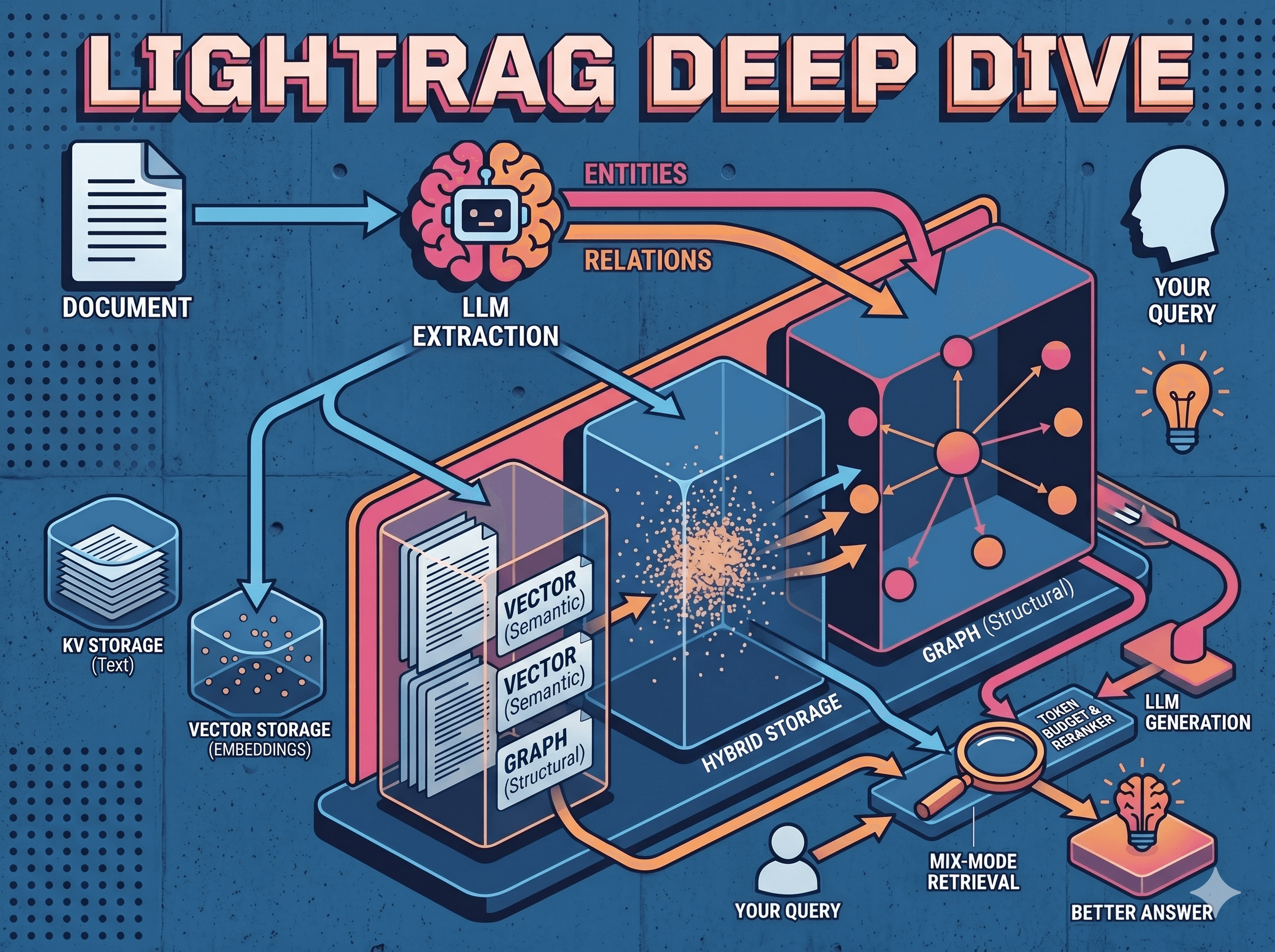
LightRAG is a graph-enhanced Retrieval-Augmented Generation (RAG) system that goes beyond traditional chunk-based RAG by incorporating knowledge graphs into text indexing and retrieval.

AI
white and black typewriter with white printer paper

What is LightRAG?

LightRAG is a graph-enhanced Retrieval-Augmented Generation (RAG) system that goes beyond traditional chunk-based RAG by incorporating knowledge graphs into text indexing and retrieval.

Key Innovation: Instead of just storing flat text chunks, LightRAG extracts entities and relationships to build a knowledge graph that enables structural retrieval alongside semantic search.

How LightRAG Differs from Traditional RAG

Traditional RAG

LightRAG


Does LightRAG Do Contextual Embedding?

No - LightRAG does NOT do contextual embedding the way Anthropic defines it.

Anthropic's Contextual Embedding Approach

Before embedding each chunk, prepend document-level context:


This requires an LLM call per chunk to generate ~50-100 tokens of context that gets baked into the embedding.

LightRAG's Approach

LightRAG's "context" comes from graph structure, not document-level prepending:

Aspect

Contextual Embedding

LightRAG

Context source

LLM summarizes document for each chunk

Entities/relationships extracted from chunk

How context is used

Prepended to chunk before embedding

Stored separately as graph nodes/edges

Retrieval enrichment

Embedded directly in vector

1-hop neighbors fetched at query time

LightRAG trades embedded context for structural context. The graph relationships serve a similar purpose (providing context about what a chunk relates to), but through graph traversal rather than prepended text in embeddings.

Storage Architecture

LightRAG uses 4 storage types for different purposes:


Storage Backend Options

Storage Type

Implementations

KV Storage

JsonFile (default), PostgreSQL, Redis, MongoDB

Vector Storage

NanoVectorDB (default), PostgreSQL (pgvector), Milvus, Qdrant, Faiss, MongoDB

Graph Storage

NetworkX (default), Neo4J, PostgreSQL (AGE), Memgraph

Doc Status

JsonFile (default), PostgreSQL, MongoDB

What Gets Stored Where

1. Original Chunks --> KV_STORAGE + VECTOR_STORAGE

Chunks are stored in TWO places:

# KV_STORAGE (text content):
{
    "chunk_id_123": {
        "content": "The company's revenue grew by 3%...",
        "source_id": "doc-1",
        "file_path": "report.pdf"
    }
}

# VECTOR_STORAGE (embedding):
{
    "id": "chunk_id_123",
    "vector": [0.023, -0.156, 0.089, ...],  # 1536 dims
    "payload": {"source_id": "doc-1"}
}
# KV_STORAGE (text content):
{
    "chunk_id_123": {
        "content": "The company's revenue grew by 3%...",
        "source_id": "doc-1",
        "file_path": "report.pdf"
    }
}

# VECTOR_STORAGE (embedding):
{
    "id": "chunk_id_123",
    "vector": [0.023, -0.156, 0.089, ...],  # 1536 dims
    "payload": {"source_id": "doc-1"}
}
# KV_STORAGE (text content):
{
    "chunk_id_123": {
        "content": "The company's revenue grew by 3%...",
        "source_id": "doc-1",
        "file_path": "report.pdf"
    }
}

# VECTOR_STORAGE (embedding):
{
    "id": "chunk_id_123",
    "vector": [0.023, -0.156, 0.089, ...],  # 1536 dims
    "payload": {"source_id": "doc-1"}
}

2. Entities --> KV_STORAGE + VECTOR_STORAGE + GRAPH_STORAGE

Entities are stored in THREE places:

# KV_STORAGE (entity metadata/description):
{
    "ACME CORP": {
        "entity_type": "company",
        "description": "ACME Corp is a technology company...",
        "source_id": "doc-1"
    }
}

# VECTOR_STORAGE (entity embedding for retrieval):
{
    "id": "entity_ACME_CORP",
    "vector": [0.045, -0.234, 0.112, ...],
    "payload": {"entity_name": "ACME CORP", "entity_type": "company"}
}

# GRAPH_STORAGE (node in graph):
Node("ACME CORP", type="company", description="...")
# KV_STORAGE (entity metadata/description):
{
    "ACME CORP": {
        "entity_type": "company",
        "description": "ACME Corp is a technology company...",
        "source_id": "doc-1"
    }
}

# VECTOR_STORAGE (entity embedding for retrieval):
{
    "id": "entity_ACME_CORP",
    "vector": [0.045, -0.234, 0.112, ...],
    "payload": {"entity_name": "ACME CORP", "entity_type": "company"}
}

# GRAPH_STORAGE (node in graph):
Node("ACME CORP", type="company", description="...")
# KV_STORAGE (entity metadata/description):
{
    "ACME CORP": {
        "entity_type": "company",
        "description": "ACME Corp is a technology company...",
        "source_id": "doc-1"
    }
}

# VECTOR_STORAGE (entity embedding for retrieval):
{
    "id": "entity_ACME_CORP",
    "vector": [0.045, -0.234, 0.112, ...],
    "payload": {"entity_name": "ACME CORP", "entity_type": "company"}
}

# GRAPH_STORAGE (node in graph):
Node("ACME CORP", type="company", description="...")

3. Relationships --> KV_STORAGE + VECTOR_STORAGE + GRAPH_STORAGE

Same pattern - THREE places:

# KV_STORAGE (relation metadata):
{
    "ACME_CORP->GMAIL": {
        "description": "ACME Corp develops Gmail",
        "keywords": "develops operates service",
        "weight": 2.0,
        "source_id": "doc-1"
    }
}

# VECTOR_STORAGE (relation embedding):
{
    "id": "rel_ACME_CORP_GMAIL",
    "vector": [0.078, -0.189, 0.234, ...],
    "payload": {"src": "ACME CORP", "tgt": "GMAIL", "keywords": "develops"}
}

# GRAPH_STORAGE (edge in graph):
Edge("ACME CORP" -> "GMAIL", relation="develops", weight=2.0)
# KV_STORAGE (relation metadata):
{
    "ACME_CORP->GMAIL": {
        "description": "ACME Corp develops Gmail",
        "keywords": "develops operates service",
        "weight": 2.0,
        "source_id": "doc-1"
    }
}

# VECTOR_STORAGE (relation embedding):
{
    "id": "rel_ACME_CORP_GMAIL",
    "vector": [0.078, -0.189, 0.234, ...],
    "payload": {"src": "ACME CORP", "tgt": "GMAIL", "keywords": "develops"}
}

# GRAPH_STORAGE (edge in graph):
Edge("ACME CORP" -> "GMAIL", relation="develops", weight=2.0)
# KV_STORAGE (relation metadata):
{
    "ACME_CORP->GMAIL": {
        "description": "ACME Corp develops Gmail",
        "keywords": "develops operates service",
        "weight": 2.0,
        "source_id": "doc-1"
    }
}

# VECTOR_STORAGE (relation embedding):
{
    "id": "rel_ACME_CORP_GMAIL",
    "vector": [0.078, -0.189, 0.234, ...],
    "payload": {"src": "ACME CORP", "tgt": "GMAIL", "keywords": "develops"}
}

# GRAPH_STORAGE (edge in graph):
Edge("ACME CORP" -> "GMAIL", relation="develops", weight=2.0)

Why the Redundancy?

Storage

Purpose

KV Storage

Fast key-based lookup, stores full text/descriptions

Vector Storage

Semantic similarity search via embeddings

Graph Storage

Structural traversal (neighbors, paths, subgraphs)

Data Flow Diagram


Query Modes Explained

LightRAG supports multiple retrieval strategies:

Mode

What it does

Best for

naive

Just chunk vector search

Simple lookups

local

Entity-focused + their relations

"Who is X?" questions

global

Relation/theme-focused

"How does X relate to Y?"

hybrid

Local + Global (no chunks)

Graph-only queries

mix

Local + Global + Naive + Reranker

Everything (recommended)

Dual-Level Retrieval Paradigm

LightRAG uses two retrieval levels to handle different query types:

Level

Purpose

Example Query

Low-Level (Local)

Specific entities + their attributes/relationships

"Who wrote Pride and Prejudice?"

High-Level (Global)

Broader topics, themes, aggregated insights

"How does AI influence modern education?"

Mix Mode - All Engines Firing

Mix mode combines all retrieval strategies:


Mix Mode Query Flow


Mode Comparison


Mix

Hybrid

Naive

Latency

Highest

Medium

Fastest

Completeness

Best

Good

Basic

Token cost

Highest

Medium

Lowest

Mix mode is the "I want the best answer, cost be damned" option.

Reading LightRAG Logs

Example log from a mix mode query:

LLM extracted keywords from your query and cached the result.

24 parallel embedding workers spun up for vector searches.


Low-level retrieval: extracted local keywords, found 40 matching entities, retrieved 116 connected relations.


High-level retrieval: extracted global keywords, found 40 matching relations, retrieved 47 connected entities.

Traditional chunk vector search found 20 chunks.


Combined and deduplicated results from all retrieval modes.

Reranker filtered down to top 20 most relevant chunks.

Token budget trimmed to 13 chunks for LLM context window.

Tuning Token Budgets

QueryParam Token Controls

from lightrag import QueryParam

param = QueryParam(
    mode="mix",
    max_total_tokens=30000,      # Total budget (default)
    max_entity_tokens=6000,      # Budget for entity descriptions
    max_relation_tokens=8000,    # Budget for relation descriptions
    chunk_top_k=20,              # Number of chunks to retrieve
    top_k=60,                    # Number of entities/relations
)
from lightrag import QueryParam

param = QueryParam(
    mode="mix",
    max_total_tokens=30000,      # Total budget (default)
    max_entity_tokens=6000,      # Budget for entity descriptions
    max_relation_tokens=8000,    # Budget for relation descriptions
    chunk_top_k=20,              # Number of chunks to retrieve
    top_k=60,                    # Number of entities/relations
)
from lightrag import QueryParam

param = QueryParam(
    mode="mix",
    max_total_tokens=30000,      # Total budget (default)
    max_entity_tokens=6000,      # Budget for entity descriptions
    max_relation_tokens=8000,    # Budget for relation descriptions
    chunk_top_k=20,              # Number of chunks to retrieve
    top_k=60,                    # Number of entities/relations
)

To Keep All Reranked Chunks

If reranker outputs 20 chunks but token budget truncates to 13:

param = QueryParam(
    mode="mix",
    max_total_tokens=50000,      # Increase total budget
    # Or reduce entity/relation budgets:
    max_entity_tokens=4000,
    max_relation_tokens=6000,
)
param = QueryParam(
    mode="mix",
    max_total_tokens=50000,      # Increase total budget
    # Or reduce entity/relation budgets:
    max_entity_tokens=4000,
    max_relation_tokens=6000,
)
param = QueryParam(
    mode="mix",
    max_total_tokens=50000,      # Increase total budget
    # Or reduce entity/relation budgets:
    max_entity_tokens=4000,
    max_relation_tokens=6000,
)

Environment Variables (Server-Wide)

MAX_TOTAL_TOKENS=50000
MAX_ENTITY_TOKENS=6000
MAX_RELATION_TOKENS=8000
CHUNK_TOP_K=20
TOP_K=60
MAX_TOTAL_TOKENS=50000
MAX_ENTITY_TOKENS=6000
MAX_RELATION_TOKENS=8000
CHUNK_TOP_K=20
TOP_K=60
MAX_TOTAL_TOKENS=50000
MAX_ENTITY_TOKENS=6000
MAX_RELATION_TOKENS=8000
CHUNK_TOP_K=20
TOP_K=60

Go Big (Watch Your Context Window)

param = QueryParam(
    mode="mix",
    max_total_tokens=100000,
    max_entity_tokens=20000,
    max_relation_tokens=30000,
    chunk_top_k=50,
    top_k=100,
)
param = QueryParam(
    mode="mix",
    max_total_tokens=100000,
    max_entity_tokens=20000,
    max_relation_tokens=30000,
    chunk_top_k=50,
    top_k=100,
)
param = QueryParam(
    mode="mix",
    max_total_tokens=100000,
    max_entity_tokens=20000,
    max_relation_tokens=30000,
    chunk_top_k=50,
    top_k=100,
)

Warning: If using a 32k context model and sending 50k tokens, it will fail.

LightRAG vs GraphRAG

Feature

GraphRAG

LightRAG

Retrieval

Traverses communities (expensive)

Vector-based keyword matching (fast)

Tokens per query

~610,000 (Legal dataset)

<100

API calls

Hundreds

1

Incremental updates

Must rebuild all community reports

Seamlessly merges new nodes/edges

LLM Requirements

  • Minimum 32B parameters recommended

  • 32KB context minimum (64KB recommended)

  • Supports: OpenAI, Ollama, Azure, Gemini, HuggingFace, LlamaIndex

Example Storage Configuration

Split storage across specialized backends:

LIGHTRAG_KV_STORAGE=PGKVStorage              # PostgreSQL
LIGHTRAG_VECTOR_STORAGE=QdrantVectorDBStorage # Qdrant  
LIGHTRAG_GRAPH_STORAGE=Neo4JStorage          # Neo4J
LIGHTRAG_DOC_STATUS_STORAGE=PGDocStatusStorage # PostgreSQL
LIGHTRAG_KV_STORAGE=PGKVStorage              # PostgreSQL
LIGHTRAG_VECTOR_STORAGE=QdrantVectorDBStorage # Qdrant  
LIGHTRAG_GRAPH_STORAGE=Neo4JStorage          # Neo4J
LIGHTRAG_DOC_STATUS_STORAGE=PGDocStatusStorage # PostgreSQL
LIGHTRAG_KV_STORAGE=PGKVStorage              # PostgreSQL
LIGHTRAG_VECTOR_STORAGE=QdrantVectorDBStorage # Qdrant  
LIGHTRAG_GRAPH_STORAGE=Neo4JStorage          # Neo4J
LIGHTRAG_DOC_STATUS_STORAGE=PGDocStatusStorage # PostgreSQL

PostgreSQL stores:

  • Chunk text content (kv table)

  • Entity/relation descriptions (kv table)

  • Document processing status (doc_status table)

Qdrant stores:

  • Chunk embeddings

  • Entity embeddings

  • Relation embeddings

Neo4J stores:

  • Entity nodes with properties

  • Relationship edges with properties

  • Graph structure for traversal

Key Takeaways

  1. LightRAG chunks AND extracts - It doesn't throw away original text

  2. Triple storage for entities/relations - KV + Vector + Graph, each serving a purpose

  3. Dual-level retrieval - Local (entities) + Global (relations) for different query types

  4. Mix mode is comprehensive - Combines all strategies with reranking

  5. Graph provides structural context - 1-hop neighbors enrich retrieval without contextual embedding

  6. Token budgets control output - Tune max_total_tokens to keep more content

References